I went to D-Link and study specification. After that I downgrade camera to DCS-950G_ A1_Firmware_v1.00 because the camera with this old firmware does not need admin authentication for streaming. It's so convenient. I do not have to send with each request the password.
I wanted to write a Groovy script, but I wanted to control the camera from the router, which I do not have Java. That's why I chose Bash.
After hours of testing, I had written a working script:
#!/bin/bash
#

WEBCAM_IP="192.168.0.20"

#######################################################################

#init
{ exec 3<>/dev/tcp/${WEBCAM_IP}/5000; echo -n "ARAGORN_INIT" >&3; cat <&3> /dev/null; } &

sleep 2

#start
exec 3<>/dev/tcp/${WEBCAM_IP}/5001
echo -n "ARAGORN_START#255055293901165#0#1#0" >&3

#data
while :
do

    head -c 40 <&3 > header.hex
    BYTES=( `hexdump -v -s 24 -n 4 -e ' 1/1 "%02X " ' header.hex` )
    HEX="${BYTES[3]}${BYTES[2]}${BYTES[1]}${BYTES[0]}"
    DATA_LENGTH=`echo "obase=10; ibase=16; ${HEX}" | bc`
    head -v -c "${DATA_LENGTH}" <&3

done
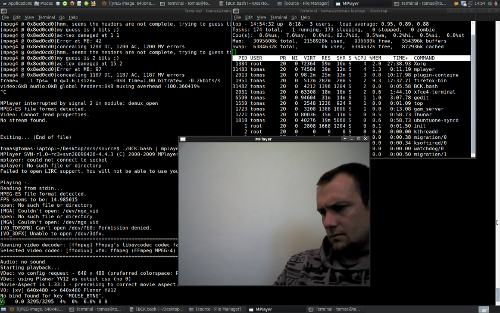
With MPlayer I can play the stream directly from the camera. Mplayer takes around 5% CPU on a single camera.
./dcs-950G.bash | mplayer - -demuxer mpeg4es
With ffmpeg I got every second actual jpeg for Motion.

It works well, thanks.
ReplyDeleteKibo, i need a help...
ReplyDeletecould you explain the protocol used to this camera for stream?
How to get the stream? what commands to send and in wich port?
I'm a Delphi programmer and i need to stream from this camera. I can't found anything to help me to develop a viewer for this camera.
I search a lot in google...
if i got the stream i can show it, but i tried to connect in port 5000(base),5001(stream),5100(ip view)...and no sucess....
but if IP VIEW LITE can....i think we can too...
i can't understand your bash script....i'm very experienced programmer....but not in Linux....
sorry for my poor english....i'm from brazil.
I'm trying to develop on viewer for 400 dcs-950, that have in a school here. They like to view 32 cameras per page....and i can't find any free software for this....
my e-mail: ale.trevizoli@gmail.com
thanks in advance....
Hi Alexandre,
ReplyDeleteyou can use Wireshark for studying communication between camera and PC.
DSC950 use port 5000 and 5001.
DCS-950G streaming:
1. ARAGORN_INIT
2. ARAGORN_START
3. read data
Is it possible to translate this for using with netcat ? :)
ReplyDeleteHello, I want to use this camera under linux.
ReplyDeleteBut, upload firmware 1.00 is down.
Do you want give me your firmware.
Thanks
Hi
Deletethere are firmware:
http://tsd.dlink.com.tw/downloads2008.asp
But you dont need firmware 1.0 for streaming.
Hello Tom,
DeleteI download all firmware versions.
I unzip all version in zip file.
I upload with this results :
1.00 fail
1.02 fail
1.06 ok
1.08 ok
2.00 ok
have you a idea?
thanks
Hi
ReplyDeleteyou did not need downgrade firmware.
Use Wireshark and connect to camera.
I found old firmware:
downloads.kibo.cz/v1.00.zip
I am not responsible of your loss.
Hi Tom,
ReplyDeleteThank you very much for this advice.
I realize you're not responsible.
Finally, I will try with this latest version.
Thank you again.
Hi Tom,
ReplyDeleteI was wondering how I could feed this to my Motion setup?
Then, Motion can do the motion detection and triggering...
Thx,
Johan
Tom - great work.
ReplyDeleteHave you succeded using camera with motion?
Maybe transcoding stream with ffmpeg then feed it to motion?
Hi Tom, i've tried to use your script but with no success. Here is the output:
ReplyDeleteroot@raspberrypi:~/Desktop# ./dcs-950G.bash | mplayer - -demuxer mpeg4es
cat: -: Connection reset by peer
MPlayer svn r34540 (Debian), built with gcc-4.6 (C) 2000-2012 MPlayer Team
mplayer: could not connect to socket
mplayer: No such file or directory
Failed to open LIRC support. You will not be able to use your remote control.
Playing -.
Reading from stdin...
stay stuck here.... until i press crtl+c
Any idea?? By the way, i can't find the firmware v.1.00. The oldest i've found is v.1.02
Thanks
Hi, I have the same problem - "cat: -: Connection reset by peer"
ReplyDeleteI suppose it is also caused by the firmware ( I have firmware 1.07 ). But the firmare 1.00 is impossible to find. Does anyone still have it?
Thanks
Hi Tom! Hello again after 10 years. Can you upload firmware v.1.00? I want to try it one last time before throwing my device away.
ReplyDeleteRespect and that i have a neat provide: How To Design House Renovation home addition construction
ReplyDelete