Showing posts with label HTML5. Show all posts

Sunday, December 5, 2021

Simple accordion on your website

Hey guys! Do you know about details and summary HTML5 tags?

This creates a simple accordion on your website. It si simple and elegant, isn't it?

Example:

JavaScript JavaScript (/ˈdʒɑːvəˌskrɪpt/),[10] often abbreviated as JS, is a programming language that conforms to the ECMAScript specification.[11] JavaScript is high-level, often just-in-time compiled and multi-paradigm. It has dynamic typing, prototype-based object-orientation and first-class functions.
Node Node.js is an open-source, cross-platform, back-end JavaScript runtime environment that runs on the V8 engine and executes JavaScript code outside a web browser. Node.js lets developers use JavaScript to write command line tools and for server-side scripting—running scripts server-side to produce dynamic web page content before the page is sent to the user's web browser. Consequently, Node.js represents a "JavaScript everywhere" paradigm,[6] unifying web-application development around a single programming language, rather than different languages for server-side and client-side scripts.

Sunday, August 31, 2014

Responsive images

In this post I summarize the techniques used for a responsive images. None of the existing techniques are not perfect. On the client side was released a new specification which combines together all the previous techniques.On the server side are arising new techniques and solutions of third parties.


Client side
  • srcset attribute
  • src-N attribute
  • picture element


Server side


Curent state (september 2014)

Example

Browser support for Picture element is weak, but you can use the polyfill. Picture Fill has recently been updated to 2.0. and you can use the actual syntax.


Grunt Responsive Images
If you are using Grunt certainly appreciate grunt-responsive-images plugin.

Monday, September 30, 2013

Add HTML5 video to old Internet Explorer - Google Chrome Frame

Google Chrome Frame is plugin for Internet Explorer 6, 7, 8, 9. The plugin replaces the slow JavaScript Engine of IE and adds WebKit kernel. It adds HTML5 video, canvas, WebGL, CSS3 and other feature to old IE browsers. In this article I show how to use Google Chrome Frame.

Rendering

You can enable Google Chrome Frame to render a page by adding an HTML metatag or using an HTTP header.


For HTML metatag add to head of your web page:
<meta http-equiv="X-UA-Compatible" content="chrome=1">

For HTTP header let send your web server header:
X-UA-Compatible: chrome=1

Prompting

For detect Google Chrome Frame and prompt users to install the plug-in you can use server-side sniffing or the CFInstall.js script. The big advantage is that users can install Google Chrome Frame without having administrative privileges on their machines. For more options see source code or developer documentation.


In June 2013 Google announced they would retire Chrome Frame, and will cease support and updates for the product in January 2014.

Video from Google IO


Tuesday, August 13, 2013

Converting video for web with FFmpeg

The plight of the HTML5 video format is bad and it looks like that will soon not change.


Formats overview:
  • WebM ( video codec: VP8, audio codec: Vorbis )
  • OGG ( video codec: Theora, audio codec: Vorbis )
  • MP4 ( video codec: H.264, audio codec: ACC/ MP3 )
  • Flash video ( video codec: H.264, audio codec: ACC/ MP3 )


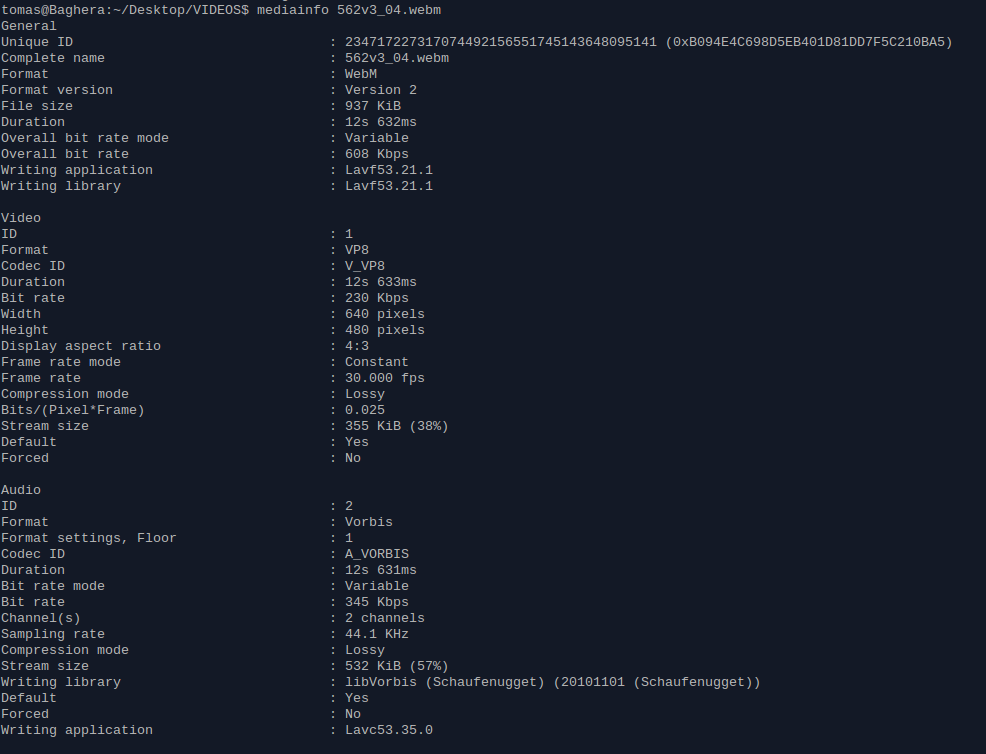
MediaInfo
MediaInfo is a tool for reading video files metadata. Using it is very simple:


FFmpeg
FFmpeg is tool for converting audio and video files. It uses libavcodec library. Converting video files with FFmpeg to required formats ist simple:


WebM
ffmpeg -i INPUT_FILE -acodec libvorbis -vcodec libvpx -b 400k OUTPUT_FILE.webm


OGG
ffmpeg -i INPUT_FILE -acodec libvorbis -vcodec libtheora -b 400k OUTPUT_FILE.ogg


MP4
ffmpeg -i INPUT_FILE -acodec libfaac -vcodec libx264 -b 400k OUTPUT_FILE.mp4


Parameters:
  • -acodec: audio codec, or -c:a in new release of FFmpeg
  • -vcodec: video codec, or -c:v in new release of FFmpeg


There are a lots of others interesting parameters.


libfaac
For the libfaac codec you need the FFmpeg compiled with --enable-libfaac. For more details read FFmpeg Wiki. Or you can use libvo_aacenc codec:
-acodec libvo_aacenc


Bash script for converting video
For painless conversions you can use a prepared bash script.


Use:
  • ./web_video_converter.sh MY_VIDEO_FILE.avi
  • ./web_video_converter.sh FOLDER_WITH_VIDEOS