Showing posts with label XML. Show all posts

Wednesday, August 18, 2010

XSLT

Text are from http://www.w3schools.com/xsl/


  • XSL stands for EXtensible Stylesheet Language.
  • CSS - Style Sheet for HTML
  • XSL - Style Sheet fot XML
  • XSL describes how the XML document should be displayed!

XSL consists of three parts:
  • XSLT - a language for transforming XML documents
  • XPath - a language for navigating in XML documents
  • XSL-FO - a language for formatting XML documents

XSLT

  • XSLT stands for XSL Transformations
  • XSLT is the most important part of XSL
  • XSLT transforms an XML document into another XML document
  • XSLT uses XPath to navigate in XML documents
  • All major browsers have support for XML and XSLT.

XSLT - Transformation

Declaration
The root element that declares the document to be an XSL style sheet is <xsl:stylesheet> or <xsl:transform>

<xsl:stylesheet version="1.0" xmlns:xsl="http://www.w3.org/1999/XSL/Transform">
or
<xsl:transform version="1.0" xmlns:xsl="http://www.w3.org/1999/XSL/Transform">

example transformation 
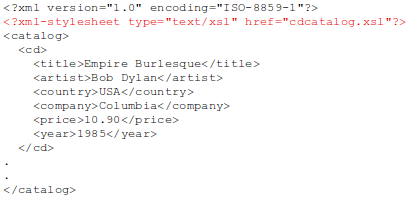
Source xml file.


Source XSL Style Sheet file.
 

Result of transformation.


<xsl:template>

The <xsl:template> element is used to build templates.

The match attribute is used to associate a template with an XML element. The match attribute can also be used to define a template for the entire XML document. The value of the match attribute is an XPath expression (i.e. match="/" defines the whole document).

example:


<xsl:value-of>

The <xsl:value-of> element can be used to extract the value of an XML element and add it to the output stream of the transformation:


<xsl:for-each>

The XSL <xsl:for-each> element can be used to select every XML element of a specified node-set:
 

Filtering

We can also filter the output from the XML file by adding a criterion to the select attribute in the <xsl:for-each> element.


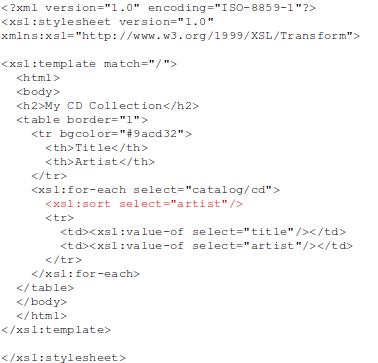
<xsl:sort>

The <xsl:sort> element is used to sort the output.


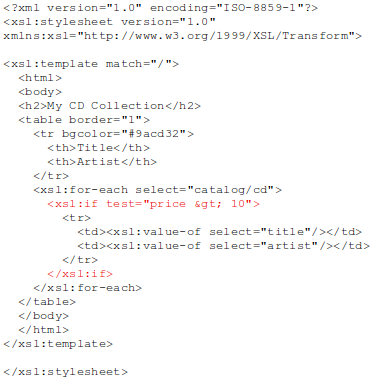
<xsl:if>

The <xsl:if> element is used to put a conditional test against the content of the XML file.

<xsl:choose>

The <xsl:choose> element is used in conjunction with <xsl:when> and <xsl:otherwise> to express multiple conditional tests.


<xsl:apply-templates>

The <xsl:apply-templates> element applies a template to the current element or to the current element's child nodes.
If we add a select attribute to the <xsl:apply-templates> element it will process only the child element that matches the value of the attribute. We can use the select attribute to specify the order in which the child nodes are processed.

Tuesday, August 3, 2010

XML schema

All text are from http://www.w3schools.com/schema


XML Schema is an XML-based alternative to DTD.

An XML Schema:
  • XML Schemas are extensible to future additions
  • XML Schemas are richer and more powerful than DTDs
  • XML Schemas are written in XML
  • XML Schemas support data types
  • XML Schemas support namespaces
Example: 

XML:
 

DTD:


XMLSchema:


The note element is a complex type because it contains other elements. The other elements (to, from, heading, body) are simple types because they do not contain other elements.


Reference to a DTD:
 

Reference to an XML Schema:


XSD - <schema> element

The <schema> element is the root element of every XML Schema.


Simple elements

A simple element is an XML element that can contain only text. It cannot contain any other elements or attributes.

The text can be of many different types. It can be one of the types included in the XML Schema definition (boolean, string, date, etc.), or it can be a custom type that you can define yourself.

You can also add restrictions (facets) to a data type in order to limit its content, or you can require the data to match a specific pattern.


Example:

XML


XSD


XML Schema has a lot of built-in data types. The most common types are:
  • xs:string
  • xs:decimal
  • xs:integer
  • xs:boolean
  • xs:date
  • xs:time

default
<xs:element name="color" type="xs:string" default="red"/>


fixed
You cannot specify another value.
<xs:element name="color" type="xs:string" fixed="red"/>


XSD Attributes

  • All attributes are declared as simple types.
  • Simple elements cannot have attributes.

Example:
<xs:attribute name="lang" type="xs:string"/>

default
<xs:attribute name="lang" type="xs:string" default="EN"/>

fixed
<xs:attribute name="lang" type="xs:string" fixed="EN"/>

optional
<xs:attribute name="lang" type="xs:string" use="required"/>


XSD Restrictions / Facets

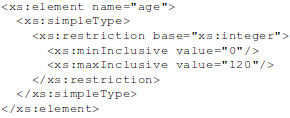
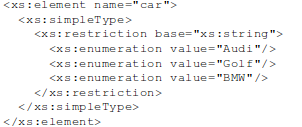
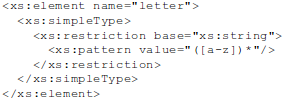
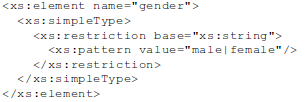
Restrictions are used to define acceptable values for XML elements or attributes.

Restrictions
ConstraintDescription
enumerationDefines a list of acceptable values
fractionDigitsSpecifies the maximum number of decimal places allowed. Must be equal to or greater than zero
lengthSpecifies the exact number of characters or list items allowed. Must be equal to or greater than zero
maxExclusiveSpecifies the upper bounds for numeric values (the value must be less than this value)
maxInclusiveSpecifies the upper bounds for numeric values (the value must be less than or equal to this value)
maxLengthSpecifies the maximum number of characters or list items allowed. Must be equal to or greater than zero
minExclusiveSpecifies the lower bounds for numeric values (the value must be greater than this value)
minInclusiveSpecifies the lower bounds for numeric values (the value must be greater than or equal to this value)
minLengthSpecifies the minimum number of characters or list items allowed. Must be equal to or greater than zero
patternDefines the exact sequence of characters that are acceptable
totalDigitsSpecifies the exact number of digits allowed. Must be greater than zero
whiteSpaceSpecifies how white space (line feeds, tabs, spaces, and carriage returns) is handled


Examples:

Restrictions on Values
 

Restrictions on a Set of Values


Restriction as pattern


 Restrictions on whitespace characters 
The whiteSpace constraint is set to "replace", which means that the XML processor WILL REPLACE all white space characters (line feeds, tabs, spaces, and carriage returns) with spaces:


Complex element

  • empty elements
  • elements that contain only other elements
  • elements that contain only text
  • elements that contain both other elements and text

A complex XML element, "product", which is empty:
<product pid="1345"/>

A complex XML element, "employee", which contains only other elements:
<employee>
 <firstname>John</firstname>
 <lastname>Smith</lastname>
</employee>

A complex XML element, "food", which contains only text:
<food type="dessert">Ice cream</food>

A complex XML element, "description", which contains both elements and text:
<description>
It happened on <date lang="norwegian">03.03.99</date> ....
</description>

Define a Complex element


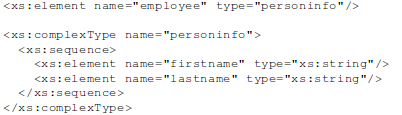
The "employee" element can have a type attribute that refers to the name of the complex type to use:


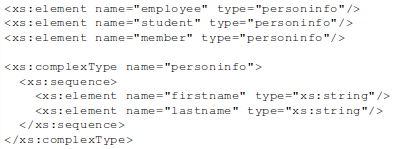
If you use the method described above, several elements can refer to the same complex type, like this:

You can also base a complex element on an existing complex element and add some elements, like this:


Complex Empty Elements


An empty XML element:
<product prodid="1345" />

To define a type with no content, we must define a type that allows elements in its content, but we do not actually declare any elements, like this:
 

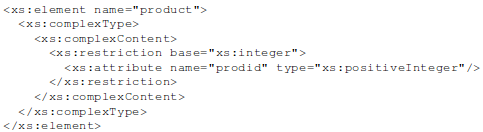
However, it is possible to declare the "product" element more compactly.


Complex Elements Only


An XML element, "person", that contains only other elements:
<person>
 <firstname>John</firstname>
 <lastname>Smith</lastname>
</person>

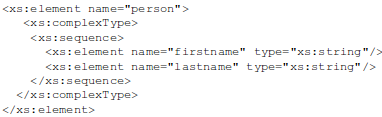
You can give the complexType element a name, and let the "person" element have a type attribute that refers to the name of the complexType (if you use this method, several elements can refer to the same complex type):


Notice the <xs:sequence> tag. It means that the elements defined ("firstname" and "lastname") must appear in that order inside a "person" element.


Text-Only Elements


Here is an example of an XML element, "shoesize", that contains text-only:
<shoesize country="france">35</shoesize>

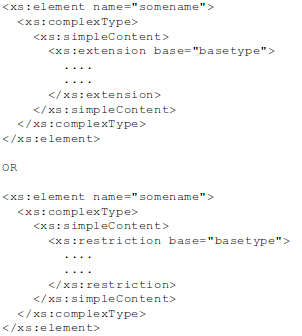
This type contains only simple content (text and attributes), therefore we add a simpleContent element around the content. When using simple content, you must define an extension OR a restriction within the simpleContent element, like this:


Mixed Content

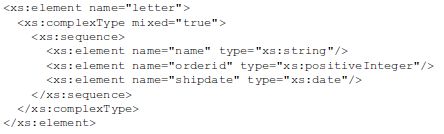
A mixed complex type element can contain attributes, elements, and text.

xml:


declaration:
 

Note: To enable character data to appear between the child-elements of "letter", the mixed attribute must be set to "true". The <xs:sequence> tag means that the elements defined (name, orderid and shipdate) must appear in that order inside a "letter" element.


Indicators

Order indicators:
  • All
  • Choice
  • Sequence

Occurrence indicators:
  • maxOccurs
  • minOccurs

Group indicators:
  • Group name
  • attributeGroup name

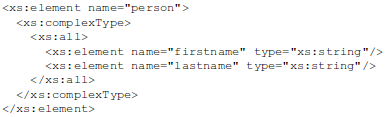
All indicator
The <all> indicator specifies that the child elements can appear in any order, and that each child element must occur only once:


Choice indicator
The <choice> indicator specifies that either one child element or another can occur:

Sequence indicator
The <sequence> indicator specifies that the child elements must appear in a specific order:

Occurrence indicators
 

Group indicators
Group indicators are used to define related sets of elements.
  • Element groups
  • Attribute groups

Declare Element groups:
 

Declare Attribute groups:


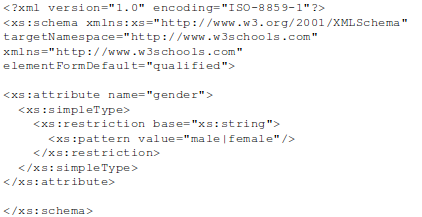
The <any> element

The <any> element enables us to extend the XML document with elements not specified by the schema.

The following example is a fragment from an XML schema called "family.xsd". It shows a declaration for the "person" element. By using the <any> element we can extend (after <lastname>) the content of "person" with any element:
 

Schema file called “children.xsd”
 

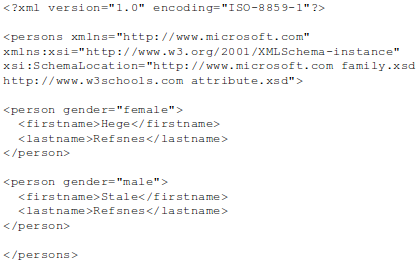
The XML file below (called "Myfamily.xml"), uses components from two different schemas; "family.xsd" and "children.xsd":


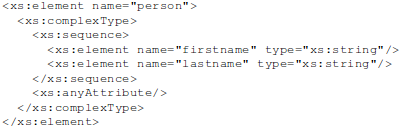
The <anyAttribute> element

The <anyAttribute> element enables us to extend the XML document with attributes not specified by the schema.

The following example is a fragment from an XML schema called "family.xsd". It shows a declaration for the "person" element. By using the <anyAttribute> element we can add any number of attributes to the "person" element:


Schema file, called "attribute.xsd"
 

The XML file below (called "Myfamily.xml"), uses components from two different schemas; "family.xsd" and "attribute.xsd"


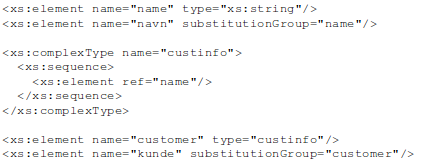
Element substitution
There are way define alias for element called substitutionGroup.


now you can use:
<kunde>
    <navn>tom</navn>
</kunde>


Basic data types


  • String
  • Date
  • Numeric
  • Misc


String types


String data type
The XML processor will not modify the value if you use the string data type.
<xs:element name="customer" type="xs:string"/>

NormalizedString data type
The XML processor will remove line feeds, carriage returns, and tab characters.
<xs:element name="customer" type="xs:normalizedString"/>

Token data type
The XML processor will remove line feeds, carriage returns, tabs, leading and trailing spaces, and multiple spaces.
<xs:element name="customer" type="xs:token"/>

Note: There are more String types. The other derived from String types.


Date and time types


Date type
The date is specified in the following form "YYYY-MM-DD".
<xs:element name="start" type="xs:date"/>

example:
<start>2002-09-24</start>

Time type
The time is specified in the following form "hh:mm:ss".
<xs:element name="start" type="xs:time"/>

example:
<start>09:00:00</start>

DateTime type
The dateTime is specified in the following form "YYYY-MM-DDThh:mm:ss". All components are required!
<xs:element name="startdate" type="xs:dateTime"/>

example:
<startdate>2002-05-30T09:00:00</startdate>

Duration type
The time interval is specified in the following form "PnYnMnDTnHnMnS".
  • P indicates the period (required)
  • nY indicates the number of years
  • nM indicates the number of months
  • nD indicates the number of days
  • T indicates the start of a time section (required if you are going to specify hours, minutes, or seconds)
  • nH indicates the number of hours
  • nM indicates the number of minutes
  • nS indicates the number of seconds
<xs:element name="period" type="xs:duration"/>

example:
<period>P5Y</period> <!--five years ->

Note: There are more Date and time types. The other derived from Date and time types.


Numeric data types


Decimal data type
The decimal data type is used to specify a numeric value.
<xs:element name="prize" type="xs:decimal"/>

example:
<prize>999.50</prize>

Integer data type
The integer data type is used to specify a numeric value without a fractional component.
<xs:element name="prize" type="xs:integer"/>

Note: There are more  numeric types. The other derived from Decimal data type. (long, short, unsigned,...)


Miscellaneous data type


Boolean data type
Legal values for boolean are true, false, 1 (which indicates true), and 0 (which indicates false).
<xs:attribute name="disabled" type="xs:boolean"/>

example:
<prize disabled="true">999</prize>

Binary data type
We have two binary data types:
  • base64Binary (Base64-encoded binary data)
  • hexBinary (hexadecimal-encoded binary data)
<xs:element name="blobsrc" type="xs:hexBinary"/>

AnyURI data type
The anyURI data type is used to specify a URI.
<xs:attribute name="src" type="xs:anyURI"/>

example:
<pic src="http://www.w3schools.com/images/smiley.gif" />