Saturday, July 24, 2010

DTD

All text are from http://www.w3schools.com/dtd


A Document Type Definition (DTD) defines the legal building blocks of an XML document. It defines the document structure with a list of legal elements and attributes.

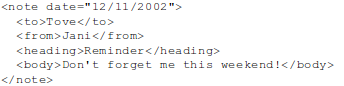
A DTD can be declared:
  • inside XML
  • external reference
DTD is not XML document.

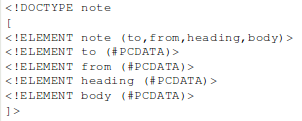
DTD inside:
 

DTD external


Why is DTD useful

  • With a DTD, each of your XML files can carry a description of its own format.
  • With a DTD, independent groups of people can agree to use a standard DTD for interchanging data.
  • Your application can use a standard DTD to verify that the data you receive from the outside world is valid.
  • You can also use a DTD to verify your own data.

Bulding blocks in XML

  • Elements
  • Attributes
  • Entities
  • PCDATA
  • CDATA
Entities
The following entities are predefined in XML:
Entity ReferencesCharacter
&lt<
&lt<
&amp&
""
''


PCDATA
PCDATA means parsed character data.
PCDATA is text that will be parsed by a parser. The text will be examined by the parser for entities and markup.

CDATA
CDATA means character data.
CDATA is text that will not be parsed by a parser. Tags inside the text will NOT be treated as markup and entities will not be expanded.

Elements

Declaring
<!ELEMENT element-name category>
or
<!ELEMENT element-name (element-content)>

Empty elements
<!ELEMENT br EMPTY>

Elements with PCDATA
<!ELEMENT from (#PCDATA)>

Element with children
<!ELEMENT note (to,from,heading,body)>

When children are declared in a sequence separated by commas, the children must appear in the same sequence in the document. In a full declaration, the children must also be declared, and the children can also have children. The full declaration of the "note" element is:

<!ELEMENT note (to,from,heading,body)>
<!ELEMENT to (#PCDATA)>
<!ELEMENT from (#PCDATA)>
<!ELEMENT heading (#PCDATA)>
<!ELEMENT body (#PCDATA)>

One occurence
<!ELEMENT note (message)>

One and more
<!ELEMENT note (message+)>

Zero and more
<!ELEMENT note (message*)>

Zero or one
<!ELEMENT note (message?)>

Either/ or content
<!ELEMENT note (to,from,header,(message|body))>

Mixed content
<!ELEMENT note (#PCDATA|to|from|header|message)*>

Attributes

Declaring attributes
<! ATTLIST element-name attribute-name attribute-type default-value>

Example:
<!ATTLIST payment type CDATA "check">

The attribute-type can be one of the following:
TypeDescription
CDATAThe value is character data
(en1|en2|..)The value must be one from an enumerated list
IDThe value is a unique id
IDREFThe value is the id of another element
IDREFSThe value is a list of other ids
NMTOKENThe value is a valid XML name
NMTOKENSThe value is a list of valid XML names
ENTITYThe value is an entity
ENTITIESThe value is a list of entities
NOTATIONThe value is a name of a notation
xml:The value is a predefined xml value


The default-value can be one of the following:
ValueExplanation
valueThe default value of the attribute
#REQUIREDThe attribute is required
#IMPLIEDThe attribute is not required
#FIXED valueThe attribute value is fixed


Default attribute value
<!ELEMENT square EMPTY>
<!ATTLIST square width CDATA "0">

In the example above, the "square" element is defined to be an empty element with a "width" attribute of  type CDATA. If no width is specified, it has a default value of 0.

Enumerated values
<!ATTLIST payment type (check|cash) "cash">

Example:
<payment type="check" />
or
<payment type="cash" />

Why is elements better then attributes

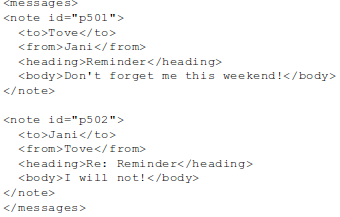
Data can be stored in child elements or in attributes.

Attribute:
 

Element:
 

Some of the problems with attributes are:
  • attributes cannot contain multiple values (child elements can)
  • attributes are not easily expandable (for future changes)
  • attributes cannot describe structures (child elements can)
  • attributes are more difficult to manipulate by program code
  • attribute values are not easy to test against a DTD
Use attributes only to provide information that is not relevant to the data.

Example:


Entities

Entities are variables used to define shortcuts to standard text or special characters.   
  • Entities can be declared internal or external
Internal
<!ENTITY entity-name "entity-value">

Example
<!ENTITY copyright "Copyright W3Schools.">

External
<!ENTITY entity-name SYSTEM "URI/URL">

Example
<!ENTITY writer SYSTEM "http://www.w3schools.com/entities.dtd">


Wednesday, July 21, 2010

XML in nutshell

All text are from http://www.w3schools.com/xml/


Basic

XML was designed to transport and store data.
XML is use to:
  • XHTML
  • WSDL for describing available web services
  • WAP and WML as markup languages for handheld devices
  • RSS languages for news feeds
  • RDF and OWL for describing resources and ontology
  • SMIL for describing multimedia for the web


Syntax rules:
  • All XML elements must have a closing tag
  • XML are case sensitive
  • XML elements must be properly nested
  • XML document must have a roo element
  • XML attribute values must be quoted


There are 5 predefined entity references in XML:
<<less than
>>greater than
&&ampersand
''apostrophe
""quotation mark


XML elements naming rules:
  • Names can contain letters, numbers, and other characters
  • Names cannot start with a number or punctuation character
  • Names cannot start with the letters xml (or XML, or Xml, etc)
  • Names cannot contain spaces


Validation

XML with correct syntax is "Well Formed" XML.
XML validated against a DTD is "Valid" XML.


DTD (Document Type Definition )
The purpose of a DTD is to define the structure of an XML document. It defines the structure with a list of legal elements:


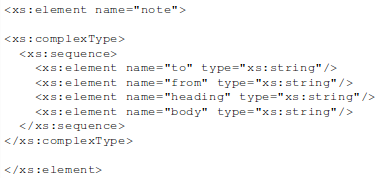
XML Schema
W3C supports an XML-based alternative to DTD, called XML Schema:


XML validator
http://validator.w3.org/


XML Namespace

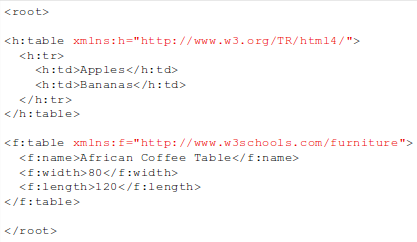
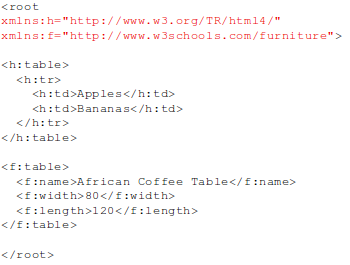
XML Namespaces provide a method to avoid element name conflicts.
Namespaces can be declared in the elements where they are used or in the XML root element:


Note: The namespace URI is not used by the parser to look up information.
The purpose is to give the namespace a unique name. However, often companies use the namespace as a pointer to a web page containing namespace information.

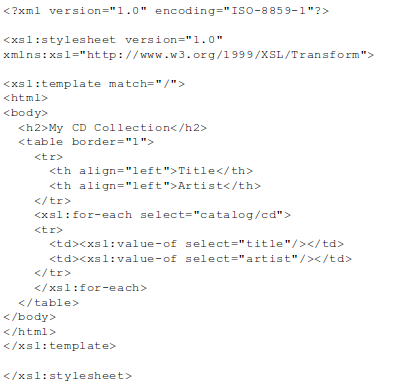
In the XSLT document below, you can see that most of the tags are HTML tags.
The tags that are not HTML tags have the prefix xsl, identified by the namespace xmlns:xsl="http://www.w3.org/1999/XSL/Transform":


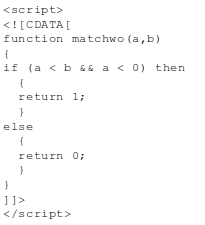
CDATA - (Unparsed) Character Data

The term CDATA is used about text data that should not be parsed by the XML parser
 

Sunday, July 18, 2010

Git a nutshell

I read
http://progit.org/

I use
http://nbgit.org/

Install


Package name
$ yum install git-core
$ apt-get install git-core

Global setting
$ git config --global user.name "John Doe"
$ git config --global user.email johndoe@example.com

Local


Creating Repository
  1. init
  2. clone
a)
//go to project folder:
$ git init

b)
$ git clone git://github.com/schacon/grit.git myDestinationFolderName

Ignore files
//cat .gitignore
doc/*.txt
*.log

Add files
$ git add [file name, folder name, or wildcard]
$ git add submodule1/PrimaryClass.java
$ git add .
$ git add *.java

Committing
$ git commit –m ”your commit message”

Status
$ git status

What's changed
$ git diff

Remove
$ git rm log/\*.log

Show history
$ git log

Show tags
$ git tag

Tags
  1. annotated
  2. lightweight
a)
Add tag
$ git tag -a v1.4 -m 'my version 1.4'

Show tag
$ git show v1.4

b)
Add tag
$ git tag v1.4-lw

Remote


Show remote repositories
$ git remote -v

Add new remote repository
$ git remote add pb git://github.com/paulboone/ticgit.git

Fetch
To retrieve remote changes without merging
$ git fetch [name of remote repository]

Pull
Pulling is the combination of a fetch and a merge.
$ git pull
$ git pull [remote name]
$ git pull [remote name] [branch name]

Send your work to remote repository
$ git push origin master

Search remote repository
$ git remote show origin

Rename remote repository
$ git remote rename pb paul

Remove remote reposirory
$ git remote rm paul

Send tag to remote repository
$ git push origin v1.5
or
$ git push origin --tags

Branching


Show branches
$ git branch -a

Create new branch
$ git branch [new branch name] [from branch]
$ git branch [new branch name]

Choosing a Branch
$ git checkout [branch name]

Merging
$ git checkout master
$ git merge hotfix

Delete branch
$ git branch -d hotfix

Send local branch "serverfix" to remote branch "awesomebranch"
$ git push origin serverfix:awesomebranch

Sunday, July 11, 2010

XLink and XPointer

All text is from http://www.w3schools.com/xlink/


XLink defines a standard way of creating hyperlinks in XML documents.
XPointer allows the hyperlinks to point to more specific parts in the XML document.


XLink

In HTML, we know (and all the browsers know!) that the "a" element defines a hyperlink. However, this is not how it works with XML. In XML documents, you can use whatever element names you want - therefore it is impossible for browsers to predict what hyperlink elements will be called in XML documents.

To get access to the XLink attributes and features we must declare the XLink namespace at the top of the document.

example: 


XPointer

If the hyperlink points to an XML document, we can add an XPointer part after the URL in the xlink:href attribute, to navigate (with an XPath expression) to a specific place in the document.

example: