Thursday, April 3, 2014

Convert PFX certificate from Windows XP to Windows 7 or Windows Server 2008

It is known that compatibility between version of MS Windows is poor. The best way is to leave MS Windows, but it is not sometimes possible. In this post I am going to describe how to solve problem of incompatibility between certificate in Windows XP and higher versions like Windows 7 and Windows Server 2008 and other.

Use cases
  • User of MS Windows XP migrates to Windows 7.
  • User of Windows XP connects to remote application on Windows Server 2008.

Problem description
User exports your certificate in PFX format on Windows XP and wants to import it to Windows 7 or Windows Server 2008. User receives the following error message:

An internal error occurred. This can be either the user profile is not accessible or the private key that you are importing might require a cryptographic service provider that is not installed on your system.


Solution 

Use OpenSSL Toolkit for converting certificate to another format. OpenSSL is available for many various OSs.

Create new PFX Check expiration date

Format description

PEM
The PEM format is the most common format that Certificate Authorities issue certificates in. PEM certificates usually have extentions such as .pem, .crt, .cer, and .key. They are Base64 encoded ASCII files and contain "-----BEGIN CERTIFICATE-----" and "-----END CERTIFICATE-----" statements. Server certificates, intermediate certificates, and private keys can all be put into the PEM format.

PKCS#7/P7B
The PKCS#7 or P7B format is usually stored in Base64 ASCII format and has a file extention of .p7b or .p7c. P7B certificates contain "-----BEGIN PKCS7-----" and "-----END PKCS7-----" statements. A P7B file only contains certificates and chain certificates, not the private key.

PKCS#12/PFX
The PKCS#12 or PFX format is a binary format for storing the server certificate, any intermediate certificates, and the private key in one encryptable file. PFX files usually have extensions such as .pfx and .p12. PFX files are typically used on Windows machines to import and export certificates and private keys.

Tuesday, March 18, 2014

CSS Gradients

Using gradients declared in CSS, rather using an actual image file, is better for control and performance. Notation of CSS gradients in browsers was changed several times. We hope that today's notation for CSS Gradients already remains unchanged. On the other hand, the signature of CSS Gradient methods are from the perspective of a programmer terrible.

The gradient method is defined as the value of the background-image.


We can use:
  • Linear gradients
  • Radial gradients
  • Repeating Gradients


You can look at support of CSS Gradients in your browser:


Linear Gradient


/**
* Draw linear gradient
* @param {String=} direction - (“to ” + ( top | right | bottom | left ) | number + ( ‘deg’ | ‘rad’ ))
* @param {...String} color - color | color + stop-color
*/
linear-gradient( direction, color_1, color_2, color_n)


Stop-color is the border, where the previous color ends and the new color begins.


Direction
  • top: 0
  • right: 90deg
  • bottom: 180deg
  • left: 270deg


Radial gradient


/**
* Draw radial gradient
* @param {String=} shape_direction - (ellipse | circle) | (ellipse | circle) + ‘at ’ + ( top | right | bottom | left )
* @param {...String} color - color | color + stop-color
*/
radial-gradient( shape_direction, color_1, color_2, color_n)


Repeating Gradient


  • repeating-linear-gradient
  • repeating-radial-gradient


The size of the gradient is determined by the final stop-color.


Reference


Tuesday, February 18, 2014

Flexbox layout

Introduction

Vertical alignment on the website was a challenge for every coder. Coders used various hacks or adding no semantic code for it. Times have changed and coders have a pretty good support for Flexbox layout.


With Flexible layout you can align inner elements horizontally and vertically. There are a lot of properties with strange names. For a perfect understanding of layout you need to read the boring documentation. See reference at the end of this post.


Examples


Example 1: Center of element
In this example, you can conveniently use property margin:auto on child element. Another option is to use flex properties justify-content:center and align-items:center.


Example 2: Navigation
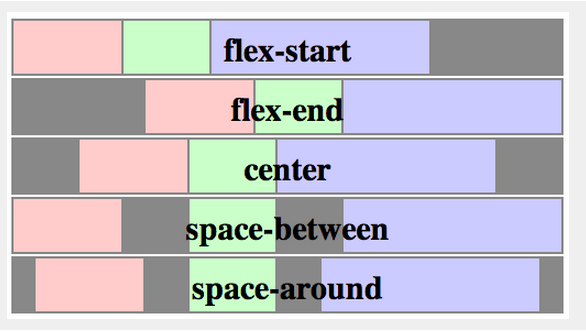
See property justify-content. Maybe you will be interested and other values:  flex-start | flex-end | center | space-between | space-around. If you have set height of navigation, you can consider property align-items:center for vertical centering.


Example 3: Products
The property flex-wrap determine wrapping at the end of line.


Properties


flex container
display: other values | flex | inline-flex;


flex-direction
Row or column. It defines the main-axis.


flex-direction: row | row-reverse | column | column-reverse


flex-wrap
Single-line or multi-line.


flex-wrap: nowrap | wrap | wrap-reverse


flex-flow
This is a shorthand for flex-direction and flex-wrap properties.


justify-content
It defines the alignment along the main axis.


justify-content: flex-start | flex-end | center | space-between | space-around


source: http://www.w3.org/TR/css3-flexbox/


align-items
This defines the default behaviour for how flex items are laid out along the cross axis on the current line.


align-items: flex-start | flex-end | center | baseline | stretch
source: http://www.w3.org/TR/css3-flexbox/


align-content
This aligns a flex container's lines within when there is extra space in the cross-axis, similar to how justify-content aligns individual items within the main-axis.


align-content: flex-start | flex-end | center | space-between | space-around | stretch

source: http://www.w3.org/TR/css3-flexbox/


order (flex item)
Controls the order in which they appear in their container.


order: number


flex-grow (flex item)
It dictates what amount of the available space inside the flex container the item should take up.


flex-grow: (default 0)


flex-shrink (flex item)
This defines the ability for a flex item to shrink if necessary.


flex-shrink: (default 1)


flex-basis
This component, which takes the same values as the width property, sets the flex-basis longhand and specifies the flex basis.


flex-basis: | auto (default auto)


Resources:

Thursday, January 23, 2014

Constructor Function in JavaScript

When you invoke the Constructor Function with new, the following happens inside the
function:
  1. An empty object is created and referenced by this variable, inheriting the prototype of the function.
  2. Properties and methods are added to the object referenced by this.
  3. The newly created object referenced by this is returned at the end implicitly (if no other object was returned explicitly).

/**
 * @constructor
 * @param{string} name
 */
var Person = function( name ) {

// 1
// var this = Object.create(Person.prototype);

// 2
// add properties and methods
this.name = name;
this.say = function( ) {
return "I am " + this.name;
};

//3
// return this;
};

var joe = new Person( "Joe" );
typeof joe === 'object'; // true
joe.constructor === Person; // true
joe instanceof Person; // true


Constructor’s Return Values

When invoked with new, a constructor function always returns an object. Constructors implicitly return this, even when you don’t have a return statement in the function. But you can return any other object of your choosing.

Is it confusing?
/**
 * @constructor
 * @param{string} name
 */
var Person = function( name ) {
this.name = name;
return name;
}

var joe = new Person( "joe" );
typeof joe === 'object'// true
joe.name // joe


Let's see what it says ECMAScript Language Specification:


When the [[Construct]] internal method for a Function object F is called with a possibly empty list of arguments, the following steps are taken:
  1. Let obj be a newly created native ECMAScript object.
  2. Set all the internal methods of obj as specified in 8.12.
  3. Set the [[Class]] internal property of obj to "Object".
  4. Set the [[Extensible]] internal property of obj to true.
  5. Let proto be the value of calling the [[Get]] internal property of F with argument "prototype".
  6. If Type(proto) is Object, set the [[Prototype]] internal property of obj to proto.
  7. If Type(proto) is not Object, set the [[Prototype]] internal property of obj to the standard built-in Object prototype object as described in 15.2.4.
  8. Let result be the result of calling the [[Call]] internal property of F, providing obj as the this value and providing the argument list passed into [[Construct]] as args.
  9. If Type(result) is Object then return result.
  10. Return obj.


Reference